Tire Size Calculator
Enter your stock tire size and new tire size — see diameter, circumference, and speedometer difference.
All data stays in your browser — we never see it.
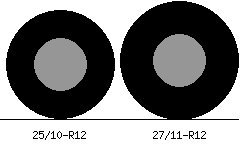
Here’s how it works. Open the tool. You’ll see two input fields. On the left, enter your current tire size – the one on your car right now. On the right, enter the new tire size you’re thinking about buying. Use the standard format: width / aspect ratio R diameter. For example: 265/70R17. The tool calculates four key numbers. Diameter in inches. Circumference in inches. Revolutions per mile. And the speedometer difference as a percentage. If the speedometer difference is over 3%, the tool flags it in yellow. Over 5%, in red. A friend of mine, a guy named Chris, learned this the hard way. He had a Ford F-150 with stock 275/65R18 tires – about 32 inches. He bought a set of 35-inch tires because he wanted the aggressive look. He installed them. The truck drove fine. Then he got pulled over for doing 72 in a 55. The speedometer said 62. He argued with the cop. The cop measured his tires and wrote the ticket anyway. Chris paid $180 and spent an afternoon in traffic school. The Tire Size Comparator works alongside the calculator. It shows you the side-by-side difference in diameter and width.Tire Size Comparator
Compare two tire sizes side by side — see diameter, width, sidewall, and revs per mile.
All data stays in your browser — we never see it.
If you’re going from 265/70R17 to 285/70R17, the comparator shows that the new tire is 20mm wider and about 0.6 inches taller. Not a huge change. The speedometer error is about 2%. Acceptable. If you’re going from 265/70R17 to 315/70R17, the comparator shows the new tire is 50mm wider and about 2.3 inches taller. The speedometer error is about 7%. That’s a problem. I had a customer with a Jeep Wrangler. He wanted 35-inch tires. His stock size was 255/75R17 – about 32 inches. The comparator showed a 3-inch diameter increase. That’s 9%. The calculator showed a speedometer error of 9 mph at 60 mph. He didn’t want that. He bought 33-inch tires instead. Error was 3% – fine. The Load Index Calculator is the third tool in the suite.Tire Load Index Calculator
Enter your tire size and load index — see maximum weight per tire and recommended load for your vehicle.
All data stays in your browser — we never see it.
When you change tire size, the load index might change. A 265/70R17 might have a load index of 115. A 285/70R17 might be 116. Higher is fine. Lower is not. Always check. The process is simple. First, find your stock tire size. Look on the door jamb sticker or the sidewall of your current tire. Second, write down the size you want to buy. Third, open the tire size calculator. Enter both sizes. Fourth, check the speedometer difference. If it’s over 3%, consider a different size. Fifth, use the comparator to see the width and diameter difference. Sixth, use the load index calculator to check the weight capacity. If all numbers are within safe ranges, buy the tires. If not, keep looking. I remember a woman named Lisa. She had a Honda CR-V. Stock tires were 235/60R18. She wanted a taller tire for more ground clearance on dirt roads. She used the calculator to test 235/65R18. The speedometer error was 2.7% – acceptable. The comparator showed the new tire was about half an inch taller. She bought them. They fit. Her speedometer reads a little slow, but she knows that now. If she had guessed, she might have bought a size that rubbed. She didn’t guess. She calculated. The Tire Size Calculator is free. It takes thirty seconds. It will save you from buying the wrong tires. The most common error I see is people buying tires that are too tall for their vehicle without checking clearance. A 2-inch taller tire might not fit in the wheel well. The calculator shows you the diameter increase. That number tells you how much lift or trimming you might need. A guy with a Toyota 4Runner wanted to go from 265/70R17 (31.6 inches) to 285/75R17 (33.8 inches). That’s a 2.2-inch increase. He needed a 2-inch lift to clear them. He didn’t know that. The calculator showed him the number. He bought the lift kit first, then the tires. That’s the right order. Another common error is people buying tires that are too wide without checking offset. The comparator shows the width difference. A 20mm wider tire might not fit with your current wheel offset. You might need different wheels or spacers. The comparator doesn’t measure offset, but it gives you the data you need to make an informed decision. The Tire Speed Rating Guide is not directly part of the size calculator, but it’s related.Tire Speed Rating Guide
Enter your tire speed rating — see maximum safe speed and performance characteristics.
All data stays in your browser — we never see it.
If you change tire size, the speed rating might also change. A 265/70R17 might be available in H and T ratings. A 285/70R17 might only come in T. If you drive at high speeds, you need H or higher. Check before you buy. Chris, the guy with the Ford F-150, learned his lesson. He now uses the tire size calculator before every tire purchase. He told me “I spent $180 on a ticket I wouldn’t have gotten if I had checked the speedometer error first.” That’s a cheap lesson compared to what some people pay. A set of wrong-sized tires can cost you $1,000 or more. The calculator is free. Use it. The tool saves your inputs locally. You can compare multiple sizes. You can bookmark your results. You can share them with your mechanic or tire shop. Don’t trust the tire shop to do this math for you. They might. They might not. They might guess. They might sell you what they have in stock. The calculator puts you in control. I’ve been using this tool for years. I still use it every time I buy tires. It takes thirty seconds. It’s never wrong.